Pages

Friday, November 4, 2011

Anchor Text Optimization


What is Anchor Text?

The anchor text, link label or link text is the visible, clickable text in a hyperlink. The words contained in the anchor text can determine the ranking that the page will receive by search engines.

Anchor text usually gives the user relevant descriptive or contextual information about the content of the link's destination. A hyperlink to the English-language Wikipedia's homepage might take this form:Anchor text may or may not be related to the actual text of the URL of the link.

Anchor Text Importance in Search Engine Optimization

Google (and to a lesser degree other search engines) heavily weight it’s Search Engine Results Pages (SERPs) towards the anchor text of links to a page. This can be demonstrated by looking at extreme examples where a pages high ranking can ONLY be attributed to anchor text and no other SEO factors. Googlebombs are probably the easiest examples to find and understand how anchor text effects SERPs.

Anchor text is the visible hyperlinked text on the page. Let’s take this example:

“Please examine our SEO case studies for validation to evaluate our search engine optimization capabilities.”

Here the words “SEO case studies” and “search engine optimization” are hyper linked to the hidden URLs http://www.seorank.com/seo-casestudies.htm and www.seorank.com respectively. The words within the hyperlink, “SEO case studies” and “search engine optimization“, are called the anchor text.

In a normally built site, anchor text is usually used to indicate the subject matter of the page that it links to. For example, the text “SEO case studies” indicates to visitors that they can expect to see content about case studies pertaining to SEO if they visit the link. This pattern of usage has been applied in search engine algorithms to enhance the relevance of the “target” or the “landing page” URL for the keywords appearing within the anchor text.

Anchor Text Enhances the Relevance of the Target Page

Please note that the keywords in anchor text enhance the relevance of the target page pertaining to the keywords used. While the relevance of the page containing the anchor text is also enhanced to some degree (because of relevant keywords appearing on that page), the real gainer is the target page URL.

Search Engine Algorithms like Anchor Text.

The inclusion of important keywords in the anchor text can make a big difference in the final ranking of your site pages. All search engines that matter, give significant weight to the anchor text on your pages. In fact Google even has a special operator: all in anchor:keyword’, which picks up text only from within the anchor text of indexed pages.

How to Optimize Anchor Text Within Your Site

Anchor text optimization can be deployed throughout your site to enhance the relevance of most of the web pages based on individual page content. You would be surprised, how easy it is, to find suitable instances of hyperlinking structures to make use of optimized anchor text.When linking to internal pages, it is better to use the format:

Using Keywords in Natural Text to Create Anchor Text


Search Engine Optimization is an important part of any search engine marketing initiative. Some people believe that submitting the site to search engines alone is sufficient in getting top-10 ranking. This is not true. Search engine submission only announces your site’s existence to search engines. To get a good search engine ranking,

Optimizing Anchor Text of External Links

Keywords within the anchor text are equally useful from links pointing to your website. If you are pursuing or considering a link building campaign, put some serious thought in writing multiple options of the title and description of the link pointing to your website.

The “title” which is usually used as the hyper-linked text, should contain your important keywords. It is good to work with ten different options of title and description as it not only gives you more room to play with several keywords, but it also helps search engines give you a wider keyword coverage.

For more information visit us at

http://www.webindia.com

Friday, October 14, 2011

Alt Tag Optimization

Definition:Link

The ALT attribute is designed to be an alternative text description for images. The ‘alt’ attribute, often called the ‘alt tag The Alt Tag is the Part of the image source tag in HTML.and XHTML. And this is the descriptive label you add to a graphic title in the source tag. The Alt Tag must be placed on images with text describing the picture or image.

Example:

Link

Alt Tag in SEO:Link

Alt tags is the alternative text used for describing images. Alt tags are displayed on the site while the emages are loading, or when you hover over the image with your mouse. They also help blind people who are using text readers to read your page.

Alt tags are another place where you should insert your keywords to improve your rankings in SERPs. Even if your text already have keywords you could still improve and reinforce your most important keywords.

If you use images in your website, its good practice to include Alt text for every image that a visitor to your site will see ALT tags filled with keywords can also be used to boost your keyword frequency and help you achieve better rankings.

Image ALT tags also make your site more accessible to visually impaired people using text readers.

Alt Tag optimization Tips:Link

  • Use alt tag for all images in the website pages
  • Use to add most relevant keyword in your Alt tag.
  • Use keywords that are present in title tag, Meta tag and body text.
  • Use 2-3 relevant keywords rather than the repetition of keywords.
  • Alt tag should not be long and must not exceed more than 7 words.

Tips to add Alt Tag Text to Images:

  • Use ALT Tags to label every image on your website pages.
  • Only use the most relevant keyword in ALT Tag to label your image.
  • Do not use to add a unrelated keywords in ALT Tags.
  • Add keyword for important images.
  • Do not repeat keywords.
  • ALT Text should be a sentence or phrase, instead of keywords separated by commas.
For more information visit us at:
http://www.webindia.com

Tuesday, September 27, 2011

What is Alexa Traffic Rank

What is Alexa Rank ?

Alexa is a very powerful tool used to rank web site traffic. Find out how your web site traffic stacks up against all your competitors.This system set by alexa.com (a subsidiary of amazon.com) that basically audits and makes public the frequency of visits on various Web sites. This becomes an important element in leveraging your blog’s ranking as a sell point to advertisers, sponsors, buyers, readers and whoever else wants a piece of your material.

How Alexa traffic ranking is calculated ?

It is based on the amount of traffic recorded from users that have the Alexa toolbar installed over a period of three months. This traffic is based on such parameters as reach and page views.

Why it is important ?

It helps Webmasters and advertisers see the true marketing potential of your Web site. The better your Alexa rank, the higher they will be willing to bid to buy advertising space on your Web site.
Given that Alexa ranking offers you information about your Web site, it is a good tool to have in view of search engine optimization.

What can you do to improve your ranking?

If you want to boost your Alexa traffic ranking, you just have to follow some quite simple rules, such as:
  • Download and install the Alexa toolbar and then visit your own site on daily basis.
  • Place the Alexa widget on your Web site. It will entice the visitors to check it out, and you know, each click counts.
  • Write useful, quality content, mostly webmaster-related. Promote it on webmaster forums and on social networking sites. The idea is to get as many computer and Internet savvy people as possible to visit your site, since the probability that they will have the Alexa toolbar installed is high.
  • Write posts on your blogs and articles about Alexa. You will get links to your pages that will help improve your ranking.
  • Try to get your articles on such social networking websites as digg.com, del.icio.us, or www.stumbleupon.com

For more information visit us at,
http://www.webindia.com

Monday, September 12, 2011

Title Tag Optimization

Definition:

The title tag is one of the most important factors in achieving high search engine rankings. The title tag is the text that appears browser's title bar. Atitle is required in every HTML and XHTML document.

Optimal Format:

tag defines the title of the document.The title element is required in all HTML/XHTML documents.</p><h2 style="font-weight: bold;" face="times new roman">Source code:<br></h2> <h2 style="font-weight: bold;" face="times new roman"><a href="https://blogger.googleusercontent.com/img/b/R29vZ2xl/AVvXsEgQwSAVhpL2K6kUTd8CE7C72RNASik7Ybye3MIjHfnZdEXx0kY2tYR1YJjIOtf7F4wByRK1X9ckLZGZkju9T4Fb3k-1eRNR9onlgKdMAlTYxKeqC-0pWTV-4tFXCkkz1_F4qRRGw65tEyQ/s1600/im.bmp"><img style="display: block; margin: 0px auto 10px; text-align: center; cursor: pointer; width: 320px; height: 30px;" src="https://blogger.googleusercontent.com/img/b/R29vZ2xl/AVvXsEgQwSAVhpL2K6kUTd8CE7C72RNASik7Ybye3MIjHfnZdEXx0kY2tYR1YJjIOtf7F4wByRK1X9ckLZGZkju9T4Fb3k-1eRNR9onlgKdMAlTYxKeqC-0pWTV-4tFXCkkz1_F4qRRGw65tEyQ/s320/im.bmp" alt="" id="BLOGGER_PHOTO_ID_5651392548880819634" border="0"></a></h2><h2 style="font-weight: bold;" face="times new roman">Optimal Format:<br></h2> <p face="times new roman"><a href="http://webindia.com/shtml/internetmarketing.shtml"><title></a> tag defines the title of the document.The title element is required in all HTML/XHTML documents.</p> <p style="font-weight: bold; font-family: times new roman;"><strong><span style="font-size: 16pt;">Source code</span></strong><span style="font-size: 16pt;">:</span></p> <p style="font-family: times new roman;" class="MsoNormal"><a href="http://webindia.com/shtml/inte_banner_exchange.shtml"><title>SEO services in Chennai, SEO Online tips, Link building Services

Primary Keyword - Secondary Keyword | Brand Name

or

Brand Name | Primary Keyword and Secondary Keyword

Elements for the title tag:
  • defines a title in the browser toolbar
  • Provides a title for the page when it is added to favorites.
  • displays a title for the page in search-engine results.

Web page Title Tag limits:

The limit of your title tags is a very important thing. The average character space lengths allowed in titles before the cutoff,

  • Google: average if 66 character spaces, max of 70
  • Bing: average if 65 character spaces, max of 71
Keyword uses in the title tag:

Use your target keywords in your title tag. For example, if your website’s main purpose is to provide service for an “SEO,” then you are going to want to mention that in your title tags.

Keyword relevance:

Search engines are all about relevance – meaning they are in the business of displaying the most relevant results for any given search query. In order to meet that criteria, you’re going to have to ensure that the keywords that you are using in your site’s title tags are relevant to the content on the page.

Steps to start writing a title:

1) The title must be related to your web page content.

2) collect your important keywords of your web page content, if you don’t know what is your web page content, Go to Google Adwords keyword tool, choose the “Website content” option in generate keyword ideas, then type your URL.

3) think about an impressive title to encourage the users to click on your web page link, I mean don’t write titles like: Search engine optimization steps, write an impressive and understandable title like: First 28 Search engine optimization steps that you should do ( Check my web pages to understand what I’m talking about).

4) The title must not be more than 60 characters.

5) After you write the title, make sure you don’t change it to avoid loosing any rank of your web pages.

6) Don’t type the same URL more than on page.

The Role of the Title tag in the web page:

Title tags play four roles on the Internet:
  1. First, the title is used by resource librarians, directory editors, and other webmasters when they link to your page. If you present editors with a well written title, your site will be reviewed faster and will get favorable treatment by the editors. If you submit a page with a title like this, "Title Tags - Title Tag Limit - Title Tag - Web Page Title - HTML Title Tags," then you can expect to wait for a review.
  2. Second, the title is displayed in the search results as the most prominent piece of information available to searchers. Taking the example above, put yourself in the mind set of a search engine user who is scanning the search results. If you see a title like the one above, which is so obviously stuffed with frequently searched keyword phrases, don't you think you would consider that the Webmaster is trying a bit too hard to get your attention, putting search engine optimization far above web usability? We think so.
  3. Third, the title is displayed by the visitor's browser (most often Microsoft Internet Explorer) in the border of the viewable screen as the visitor is viewing your website. This serves as an anchor so that the visitor knows where he or she is on your website. For this reason, titles need to clearly relate to their page and should include bread crumb or mouse trail information if there is space available. Microsoft's browser, called Internet Explorer, displays the first 95 characters of your title tag. For title tags longer than 95 characters, Internet Explorer will simply crop the tag, as you can see it has done to the title of this Web page.
  4. Fourth, the title is used by the major search engines as the most important piece of information available in order to help them determine the topic of your page, and thus to determine the ranking of your page in their search results. Given that the title is the most important factor in your page's ranking, it can be very tempting to load the title tag with keywords. For the first three reasons mentioned above, you should avoid the temptation.
For more information visit us at:
http://www.webindia.com

Friday, August 26, 2011

Meta Tag Creation


Meta tags provide information about your Web page to search engine robots so that the search engine can better understand what your site is about. Meta tags provide this information in a format that the web crawlers/spiders that visit your site can understand.
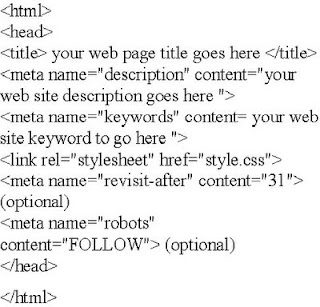
Metatag code is inserted into your html code at the head of the document between the and . Meta tags are used by many search engines

Benefits of
Meta Tags:

  • For pages that have moved
  • Opening sequences
  • Improve search engine results.

Meta Tag Format:


Metatags and their Uses:

Title
:

The title of the web page is perhaps the most important of all meta tags.

Keywords:

Keywords should be separated by commas,with the more important words listed first. Note:Inktomi(acquired by Yahoo!) was said to be the only major search engine that using the keywords meta tage to index sites.

Description:

The page description should be less than 200 words.

Author:

This represents the name of the person who authored the page


Revisit:

This sets the frequency of a spider's return.

Refresh:

This field must contain a URL that refers the page to another link in a specified number of seconds.

Robots:

Web spiders can be restricted using the following Robot meta tags:
  • All - Robots may traverse and index the page
  • No Index - Robots may traverse but not index the page.
  • No Follor - Robots may index the page but not follow it.
  • None - Robots may neither index nor traverse the page


For more information visit us at:
http://www.webindia.com

Friday, August 19, 2011

Keyword Analysis


Keyword Analysis

The keyword analysis is used to determine the most productive content and link acquisition strategies. It is also used to create a list of critical phrases that are used to track the success of the SEO campaign.

The process of analyzing which keywords are most likely to deliver the results you seek. keyword analysis utilizes a variety of search engine data to determine which search words and phrases are most likely to bring the greatest ROI to a given website.

A proper Keyword Analysis is always the first step to a solid search engine marketing campaign. The purpose of the analysis is to determine under which search terms your website should be marketed. There are several factors to consider during the keyword analysis process.

The Right Organic SEO Keywords. Having successfully completed hundreds of keyword analyses, we felt that it was time to revisit the organic keyword analysis process. In our original piece we discussed how not all organic keywords are created equal.

Choosing the right keywords involves other factors:

Steps for Completing an Organic Keyword Analysis

  • Evaluate Your Existing Keywords
  • Find Keywords form Within
  • Speak the Language of your Users
  • Examine Your Competitor’s Sites
  • Organize / Categorize your Keywords Cull Your Keywords
  • Examine the competitive Landscape
  • Consider the Search Volume Factor
  • Finalize Your Keywords
  • Monitor Your Organic Visibility
  • Revisit Your Organic Keyword List
Tools Used in a Keyword Analysis
  • Keyword Discovery
  • Google Adwords Keywords Tool
  • SEOBook Keyword Suggestion Tool
  • MSN adCenter Labs Keyword Forecast Tool

For more infomation visit us at:
http://www.webindia.com


Monday, August 8, 2011

Keyword research

Keyword research is one of the most important parts of online marketing. Keyword research is an important part of the overall search engine marketing process.

keyword

A Search engine optimization(SEO) term for a word or phrase that you type into a search engine when looking for a page on the web.

On Page Keyword Characteristics

There are several characteristics that can be applied to the keywords and key-phrases in the context of on-page SEO:

  • Prominence
  • Density
  • Frequency
  • Proximity

keyword prominence

Keyword prominence is an important thing in the on-page optimization, prominence is a ameasure of keyword importance that indicates how close a keyword is to the beginning of the analyzed page area. Keyword prominence is calculated separately for each importance page area.

keyword density.

Keyword density is a number of keywords to the rest of content on page

Keyword Density = ([Keyword Count]*100)/(Total Word Count]

For example:

you have a 500 word article about keyword RESEARCH, and you are optimizing the word for “RESEARCH ”

Total Word Count: 1500
RESEARCH keyword uses: 18
“RESEARCH” density = (18*100)/1500

Keyword density for “RESEARCH” on the page is 1.2%

keyword frequency

The number of time that a keyword appears on a web page.

keyword
Proximity

Keyword proximity refers to the distances between each occurrence of your keyword phrase.

Keyword Research Tools

There many online keyword research tools, and many of them work differently and provide you with different data.

Following is a list of keyword research tools:

Word tracker

Niche BOT

Digital Point keyword suggestion tool

Trellian Keyword Discovery

Apogee Web Consulting free keyword research tool


For more information visit us at:

http://www.webindia.com
